Trim the Noise. Keep the Motion.
MotionTrim helps Premiere Pro creators generate clean camera cuts for service videos and talking-head edits, then apply them directly to the timeline.
14-day free trial, then 4.99 EUR / month. Cancel anytime.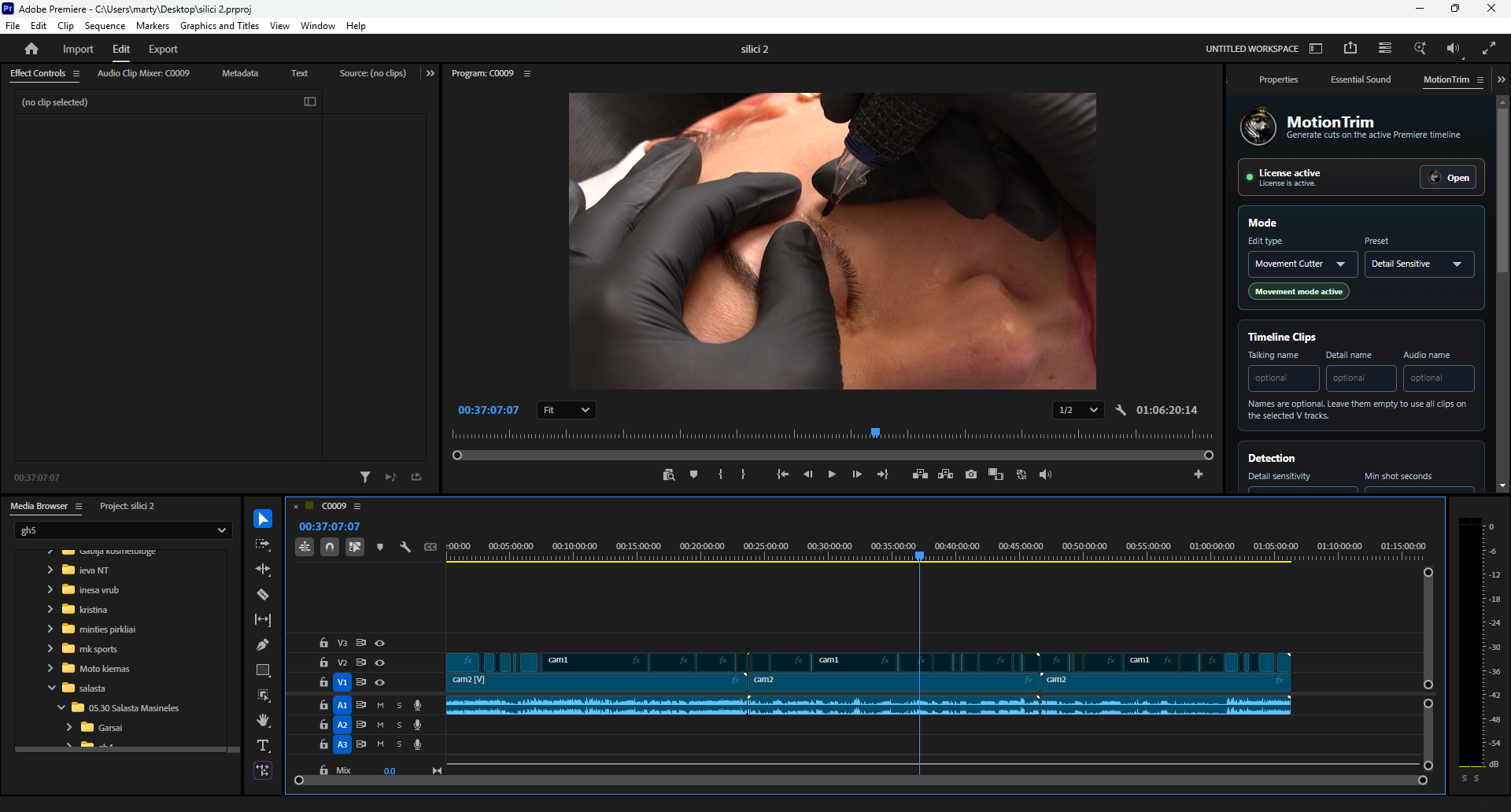
Everything focused on cleaner Premiere cuts.
MotionTrim is not a generic dashboard. It is built around the edit decisions creators repeat every day.
AutoCut Movement
Find motion-heavy detail moments for beauty, tattoo, PMU, skincare, and service videos.
AutoCut Podcast
Create camera switches for interview and talking-head timelines where clean pacing matters.
Smart Camera Switching
Generate camera-cut decisions from your selected tracks and review them in Premiere.
Premiere Timeline Cuts
Apply edits directly to the active Premiere timeline instead of rebuilding the project elsewhere.
Local Video Processing
MotionTrim is designed so video processing happens on your computer.
Audio Stays Untouched
Keep your original audio structure while MotionTrim focuses on video camera cuts.
Edit directly from Premiere.
Open the MotionTrim panel, choose a mode, generate cuts, and review them on your active timeline.
From raw timeline to reviewable cuts.
A short setup flow keeps the editor in control and avoids sending the project through a separate page builder or cloud dashboard.
Place your tracks
Put cameras and audio on the Premiere timeline tracks you want MotionTrim to inspect.
Choose a mode
Select AutoCut Movement or AutoCut Podcast depending on the type of edit.
Generate video cuts
Click Generate Video and let MotionTrim prepare timeline cut decisions.
Review the timeline
Check the result inside Premiere, adjust where needed, and keep creative control.
Choose the AutoCut mode that matches the edit.
Podcast edits and movement-led edits need different cut logic. MotionTrim separates those workflows so the result is easier to review.
AutoCut Podcast
For basic camera cuts in podcasts, interviews, and talking-head edits where the active speaker guides the camera choice.
AutoCut Movement
For movement detection when sound is not the main reason to cut, such as hands, tools, detail shots, and service videos.
Quick answers before you try MotionTrim.
Does MotionTrim work inside Premiere Pro?
MotionTrim works from a Premiere panel and applies generated video cuts to the active Premiere timeline.
Do I need to upload my video?
The product is designed so video processing happens on your computer. The website plugin itself does not upload or process videos.
Does MotionTrim cut audio?
MotionTrim focuses on video camera cuts. Your audio stays untouched so you can keep your existing mix and timing.
Can I use it for podcasts?
Yes. AutoCut Podcast is intended for interview, host, guest, and talking-head camera switching workflows.
What is AutoCut Movement for?
AutoCut Movement is for detail-heavy service videos where motion in the shot helps decide when a camera angle should be used.
Can I cancel?
Yes. Subscriptions should be cancelable through the account or checkout portal connected to MotionTrim. This website plugin only displays the configured links.
Cut the camera work. Keep the creative control.
Generate cleaner camera cuts for movement-based and talking-head edits, then review everything on your Premiere timeline.